
Agency onboarding
Place sales reps with your clients
Use your agency account to post client openings, meet NWS-certified sales reps and track who starts with each client. NWS charges no placement fee.
Apply as an agency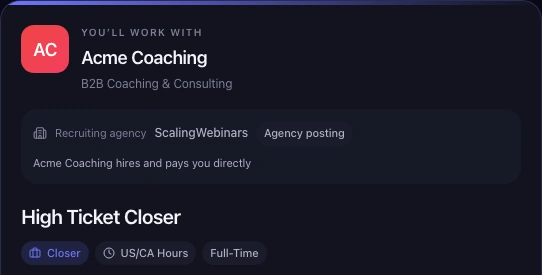
Set up your agency account
Apply under your agency’s name
Choose “We’re an agency placing reps at client companies.” Use your agency’s website or business social profile. Tell us what roles you place, who employs the reps and whether you have written client agreements.
Enter your agency’s average monthly revenue before expenses. For monthly on-target earnings (OTE), enter the expected base pay plus commission for one rep who hits target, in US dollars.
Finish setup after approval
We’ll email you when we finish reviewing your agency. If we ask for more information, reply to that email. After approval, sign in with the account you used to apply. If NWS invited you directly, use your private setup link.
Add your agency profile and hiring contact. An authorized representative signs the placement agreement in the job board unless your agency has already signed.
Bring your recruiters in. Once your account is active, the owner can open Profile → Team and invite colleagues by work email. Your recruiters share access to the agency’s roles, applicants and placements across clients. Hiring emails go to the agency’s notification address.
Post a role for a specific client
Open Client roles → Post a client role. Have the client’s pay range, working hours and number of openings handy. You can leave the draft and return in the same browser on the same device.
- Client
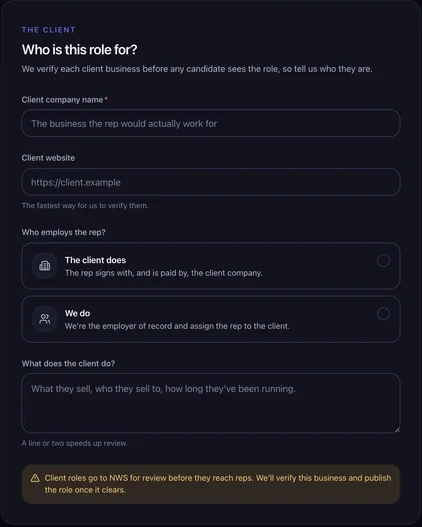
- Enter the client’s business name, website and what they sell. Specify who hires and pays the rep. It can be the client directly or your agency assigning the rep to the client.
- Role
- Choose the sales position, give it a title and select the client’s industry.
- Pay
- Enter the monthly OTE range, compensation model and worker classification. Reps must be able to take the role without paying fees or buying training, leads or software.
- Setup
- Choose the client’s working time zone. Add the hours, time commitment, lead source and open seats.
- Interviews
- Add your booking link or choose to schedule by email. For a confidential client role, use your agency’s booking link.
- Application
- Add or reuse screening questions. If you want a Loom recorded for this opening, give the rep a prompt before posting.
- Review
- Preview the listing as a rep, check the client details and submit it. Your review screen tells you whether the role goes to NWS for approval.
Check the role’s status in Client roles
- Awaiting NWS review
- NWS is reviewing the client. Reps can see the listing once it’s approved.
- Active
- The role is live. Reps can apply, and your agency can invite candidates.
- Not approved
- Read the reason, correct the client details and submit a new posting.
If NWS has enabled trusted posting for your agency, most client roles go live when you submit them. Check the status of each posting.
When to name the client
Every client role identifies your agency and tells the rep who will hire and pay them. How you introduce the client depends on your account’s posting terms.
Standard client roles
Use the client’s name in the client fields. Make sure the rep knows who the client is before their first interview for the role, including an initial interview with your agency.
Confidential client roles
If this option is enabled for your agency, enter the client’s identity in the private fields. Candidates see your agency’s name. Keep identifying details out of the public title, description, screening questions, Loom prompt and links.
You can screen the rep yourself first. Share the client’s name privately before the rep’s first interview with that client.
Introduce a rep to the right client
When a rep applies
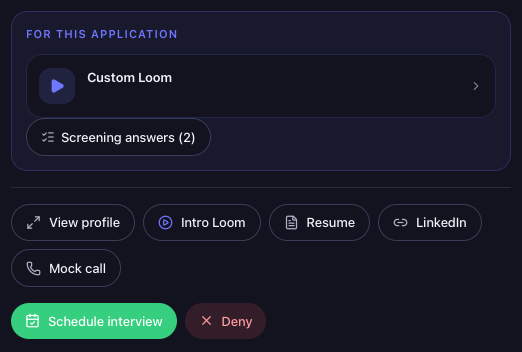
Open Applications, review their profile and any screening answers or custom Loom, then select Schedule interview. NWS introduces your agency and the rep on one email thread, with your booking link if you added one.
When you find a match
Open Browse Candidates to meet recommended reps. Choose Invite to interview and select the client’s active role with an open seat. If two clients need a closer, check the client name alongside the role title. You and the rep receive the introduction when they accept.
Hand off to the client’s hiring team
Your agency arranges the client interview. Once the client role is active, share the rep’s materials only with the people hiring for that opening and only if the rep applied to it or matched with it. Tell them the materials are confidential and can be used only to evaluate the rep for that opening. Keep job board access with your agency. The client can review the materials you share without signing a separate NWS agreement.
Confirm and track each placement
When the rep accepts the job
Select Confirm hire on the application for that client role. Either the rep or your agency can confirm first. Enter the start date if it’s ahead. Once both sides confirm, one seat fills and the hire appears under Placed reps.
When hiring plans change
A multi-seat role stays open for the remaining seats. Pause it if the client stops hiring and reactivate it when they’re ready. If a placement ends, open Placed reps → Report role ended. NWS asks the rep to confirm. The placement stays active until the end is confirmed.